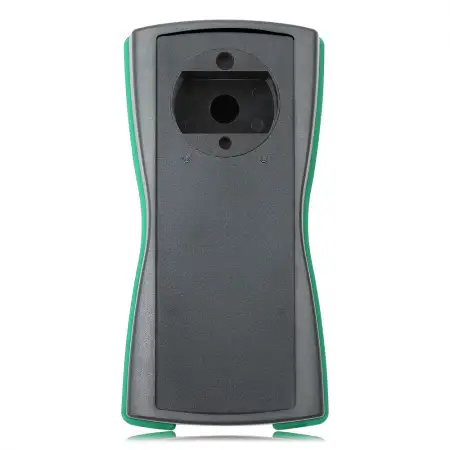
Scorpio-LK Tango Transponder Key Programmer with 1-Year Subscription



scorpio-lk / Key Programmers
The Tango Programmer by Scorpio-LK is a professional RFID transponder programming device developed for automotive locksmith and immobilizer applications, with a strong focus on All Keys Lost solutions.
Tango covers a wide range of vehicle brands, models, transponder types and immobilizer systems spanning the last three decades. Scorpio-LK continues to develop the platform with new software, firmware and application support.
This new Tango includes Tango Basic Software plus a free 1-Year Tango Subscription, which gives access to all Tango functions and features for 365 days.
Key Features
- Original Scorpio-LK Tango Programmer
- Includes Tango Basic Software
- Includes a free 1-Year / 365-Day Tango Subscription (requested after registration of the new device)
- Active subscription unlocks all Tango functions and features for 365 days
- Key Maker functions
- Transponder cloning
- Transponder image generation
- Advanced transponder functions
- SLK Emulator functions
- Transponder tools and utilities
- Support for a wide range of vehicle brands and immobilizer systems
- Tango+ OBD Framework support for applicable Toyota/Lexus and Subaru systems
- Software and firmware updates available directly from Scorpio-LK
- Continuously updated vehicle and transponder coverage
Scorpio-LK organizes Tango’s functionality into Advanced Functions, Key Makers, Image Generators, Transponder Cloning, SLK Emulators and Transponder Tools, with individual functions identified as either Base Software or Subscription.
What’s in the Box
- 1 x Scorpio-LK Tango Transponder Programmer
- USB 2.0 A-Male to B-Male cable — confirm if included
- Tango Basic Software (activated on the device)
- 1-Year Tango Subscription (requested after purchase — see below)
Included 1-Year Tango Subscription
Newly acquired Tango devices receive a free 1-year Tango Subscription upon registration and request.
An active Tango Subscription gives you access to all Tango functions and features for 365 days. Functions marked Base Software stay available after the subscription ends.
Important: The included subscription is not active out of the box. It must be requested and activated after you receive your new device.
How to Request Your Included 1-Year Subscription
After receiving your Tango, you may request the free subscription activation file using one of the following methods:
- Register your Tango on the official Scorpio-LK Forum
- Contact Scorpio-LK directly and provide your Tango serial number
- Contact KEY4 with your Tango serial number and KEY4 order number, and we can assist with submitting the activation request to Scorpio-LK
Scorpio-LK will verify that the Tango is a new device before issuing the activation file.
Official Scorpio-LK Forum: https://forum.scorpio-lk.com/
Scorpio-LK Contact Page: https://www.scorpio-lk.com/contacts.html
Activating the Subscription License
The Tango Subscription is activated using a Scorpio-LK *.lic license file. Once you receive the activation file:
Tango.exe → Help → Updates → Add License → select the .lic file
Important: The activation file is valid for 7 days after it is generated. After that it expires and Tango will no longer accept it, so load it into your Tango promptly.
Check Your Remaining Subscription Time
Tango.exe → Help → Updates → View Licenses
The first row shows a counter with the subscription time remaining.
What Happens After the 1-Year Subscription Expires?
Your Tango does not stop working when the subscription expires. After expiration:
- All functions marked Base Software remain available
- Tango continues receiving software and firmware updates
- Key makers activated on your device before the subscription continue to work
- Functions marked Subscription require an active subscription
- Another 1-year Tango Subscription may be purchased to restore access to all functions
Tango Functions & Vehicle Coverage
Tango has an extensive and continuously updated application database. KEY4 recommends checking Scorpio-LK’s official Tango Features database before purchasing for a specific vehicle, transponder or function. The database includes:
- Advanced Functions, Key Makers, Image Generators, Transponder Cloning, SLK Emulators and Transponder Tools
- Base Software vs. Subscription status for each function
- Required or compatible transponders
- Vehicle and system-specific information
Official Tango Features & Coverage: https://www.scorpio-lk.com/tango-features.html
Because Scorpio-LK updates its software and coverage over time, the manufacturer’s current database is the authoritative source for supported applications.
Tango+ OBD Framework
Tango also supports applicable Tango+ OBD Frameworks. Scorpio-LK currently documents Tango+ applications for Toyota/Lexus and Subaru systems, including All Keys Lost solutions, key learn/erase, IDcode & ESL registration and other system-specific functions.
Important: Tango+ OBD functions may require additional equipment, such as:
- Compatible J2534 PassThru interface
- SLK Emulator(s)
- Appropriate transponders
- Other application-specific Scorpio-LK hardware or accessories
These accessories are sold separately and are not included unless listed in What’s in the Box.
Software Download
Download Tango software directly from Scorpio-LK. KEY4 recommends downloading from the manufacturer rather than third-party sources to ensure you receive the current official setup files.
Official Tango Software Download: https://www.scorpio-lk.com/downloads-tango.html
After installing Tango and connecting the device, launch Tango.exe. The software automatically checks for and installs the latest software and firmware updates during setup.
System Requirements
According to Scorpio-LK, Tango requires:
- 32-bit (x86) or 64-bit (x64) Windows PC
- Windows 7, 8, 10 or 11 (64-bit); Windows XP and Vista (32-bit) use a separate installer
- 1 GB available storage space
- Internet connection
- USB 2.0 A-Male to B-Male cable
- Compatible J2534 PassThru interface for Tango+ OBD Framework functions
Frequently Asked Questions
Does this Tango include a subscription?
Yes. A new Tango includes a free 1-Year / 365-Day Tango Subscription. It must be requested and activated after receiving the device.
What does the subscription unlock?
An active subscription gives access to all Tango functions and features for 365 days.
Does Tango stop working after one year?
No. Tango continues operating with all Base Software functions, and software and firmware updates remain available. Subscription functions require renewal.
Do I need to renew the subscription every year?
Only if you want continued access to functions marked Subscription. Base Software does not require an active subscription.
How long is a Tango Subscription?
Scorpio-LK currently offers the subscription in 1-year / 365-day periods only.
How do I activate my included subscription?
Register/request the subscription through Scorpio-LK, or contact KEY4 with your serial number and order number and we can assist with the request. Once the license file is issued, load it through Help → Updates → Add License.
How long do I have to use the activation file?
The activation file is valid for 7 days after generation, so activate it promptly.
How can I check how much subscription time remains?
In Tango.exe select Help → Updates → View Licenses. The first row shows the remaining subscription time.
Does the subscription include every accessory needed for every function?
No. The subscription provides access to software functions. Certain procedures require separate transponders, SLK emulators, cables, adapters, J2534 devices or other hardware.
Where do I download the Tango software?
Directly from Scorpio-LK: https://www.scorpio-lk.com/downloads-tango.html
Where can I check exact vehicle and transponder coverage?
Use Scorpio-LK’s Tango Features database: https://www.scorpio-lk.com/tango-features.html