Hide

XTOOL AutoProPad G3 Core Automotive Key Programmer

XTOOL AutoProPad G3 Core Automotive Key Programmer-0 thumb
XTOOL AutoProPAD G3 Core Key Programmer | KEY4 thumb
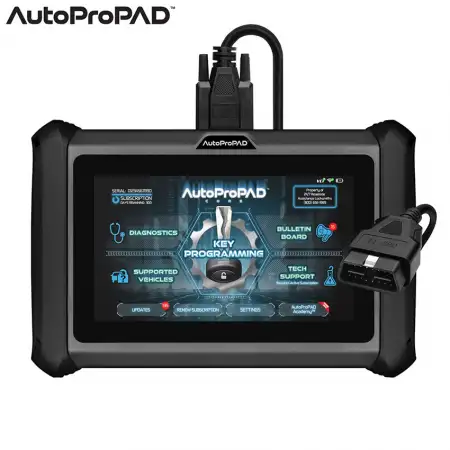
XTOOL AutoProPAD G3 Core wired OBD-II key programmer for domestic and Asian vehicles. Quad-core 1.5 GHz, 7
PD-XTOOL-G3CORE

XTOOL AutoProPad G3 Core Automotive Key Programmer

33 answered questions
$949.00

ModelAPPAD-CORE
VCIWired OBD-II
Processor / MemoryQuad-Core 1.50 GHz, 2GB RAM / 64GB
Screen7 in. Touchscreen, 1024x600
Battery2,500 mAh (approx. 4 hours)
ConditionNew

XTOOL AutoProPAD G3 Core Automotive Key Programmer

Streamlined, Efficient and Built for Speed

For automotive security professionals looking for the perfect balance of power and simplicity, the XTOOL AutoProPAD G3 Core delivers. As the successor to the AutoProPAD BASIC, it focuses strictly on OBD-II key making to provide fast, accurate results without unnecessary complications. It is the right tool for locksmiths who want a programmer that easily handles everyday jobs.

Why Choose the AutoProPAD Core?

The primary focus of the Core is simplicity and speed. The user interface has been completely overhauled, and the streamlined workflow makes it easy to navigate. The Core provides all the essential features you need for most domestic and Asian vehicles, making it a dependable choice when you need to get the job done quickly and accurately.

Outstanding Features

  • Wired OBD-II Key Programming: Designed to program keys to vehicles with a direct link to the immobilizer through the OBD-II port. If you want a budget-friendly key programmer with a simplified method, this is the right tool.
  • User-Friendly Interface: An intuitive interface with improved logic and programming flow compared to previous generations. Fewer button presses and a shorter learning curve keep you focused on the job.
  • VIN Auto-Detect: Identifies the vehicle by VIN to speed up the programming process.
  • Robust Construction: Rugged aluminum chassis with rubberized handles for a comfortable grip and impact resistance, plus a new and improved steering wheel mount. An insulated, molded plastic carrying case is included to protect your investment between service calls.
  • Enhanced Processor: A Quad-Core 1.50 GHz processor gives smooth operation and quick response times.
  • Smart Assist Technology: Programming keys isn't just about speed; it's about precision. Smart Assist is your personal assistant for key programming, giving tips, advice and recommendations based on the connected vehicle. From transponder keys and chips to smart keys and remotes, it helps you make the right choice every time. It also provides key blade information such as MACS, space and depth, and code series. With hundreds of new vehicles added monthly, the information is always up to date.
  • Coming Soon: Smart Assist will include FCC ID recommendations for all remotes and smart keys.
  • Diagnostics: Basic diagnostic functions with 13 special functions.
  • Supported Languages: English, Spanish and French.

Specifications

  • Model / Part #: APPAD-CORE / 20426809
  • VCI Interface: Wired (OBD-II programming cable)
  • CPU: Quad-Core 1.50 GHz processor
  • RAM: 2GB
  • Storage (ROM): 64GB
  • Battery: 7.3V @ 2,500 mAh lithium-ion
  • Battery Life: Approx. 4 hours
  • Screen: 7"" capacitive touchscreen
  • Screen Resolution: 1024x600 HD
  • Camera: 8MP autofocus with flash
  • Connectivity: USB 3.0 Type-C (data and charging) and VGA > DB15 > OBD-II
  • Construction: Rugged aluminum chassis with rubberized handles
  • Steering Wheel Mount: Yes, new and improved
  • Product Storage: Insulated plastic carrying case
  • Anti-Theft: User PIN code, embedded ownership registration and instant internet verification
  • Technical Support: U.S.-based live support from automotive locksmiths (requires active subscription)

Real Support from Real Locksmiths

AutoProPAD includes live, U.S.-based technical support from working American automotive locksmiths who understand your trade and the tool. Machines with an active subscription get unlimited access to live technical support.

Annual Subscription

One year of programming updates and technical support is included with the machine. Renewing the subscription extends the machine warranty for the duration of the subscription coverage.

After the first free year, keep your AutoProPAD up to date with the AutoProPAD Core & G3 Evolution Annual Subscription. It is a digital product (no physical delivery) that includes 1 year of programming updates, server access, live tech support and an extended warranty.

Warranty & Repair Services

When something goes wrong with your tools, it affects your ability to serve your customers. AutoProPAD warranty and repair services are built for fast turnaround times to keep your downtime to a minimum and get you back to work quickly, with every machine handled with care.

Anti-Theft Protection

Key programmers have become targets for theft and even violent robberies against working locksmiths. AutoProPAD uses a user PIN code, embedded ownership registration and instant internet verification to make the machine useless to anyone who is not the registered owner.

After registration, a PIN code of your choice is required every time you power on the AutoProPAD or wake it from sleep mode, just like unlocking your phone. If an incorrect PIN is entered multiple times, the programmer is locked until the registered owner proves ownership. The device must also connect to the internet briefly once every 24 hours to verify it has not been reported stolen. The tool does NOT need to stay connected to the internet to make keys. After the brief check, it keeps working for another 24 hours, and every connection renews the 24-hour window automatically.

Why AutoProPAD?

AutoProPAD devices have become a staple in the locksmith community for their reliability, advanced capabilities and ease of use. Designed by automotive locksmiths for automotive locksmiths, the AutoProPAD G3 series focuses on speed, versatility and continuous software updates, so you can handle any job at any time. Whether you're dealing with the latest smart keys or older immobilizer systems, AutoProPAD keeps you ahead of the curve so you never have to turn a customer away.

AutoProPAD G3 Core vs. G3 Evolution

  • VCI Interface: G3 Evolution – Wireless (compact Wi-Fi VCI) | G3 Core – Wired (OBD-II programming cable)
  • Processor: G3 Evolution – Quad-Core ARM Cortex-A35 1.51 GHz | G3 Core – Quad-Core 1.50 GHz
  • RAM: G3 Evolution – 4GB | G3 Core – 2GB
  • Battery: G3 Evolution – 5,000 mAh (approx. 7 hours) | G3 Core – 2,500 mAh (approx. 4 hours)
  • Screen: G3 Evolution – 8"" sunlight-adaptive, 1024x768 | G3 Core – 7"", 1024x600
  • EEPROM & Key Pre-Coding (KC100): G3 Evolution – Included | G3 Core – Not included
  • Charging Dock: G3 Evolution – Included | G3 Core – Not included
  • Diagnostics: G3 Evolution – Premium suite, 36+ special functions, Topology, Vehicle Health Report | G3 Core – Basic diagnostics, 13 special functions

Need wireless programming, EEPROM and key pre-coding? See the XTOOL AutoProPAD G3 Evolution.

Package Includes

  • AutoProPAD G3 Core Tablet
  • USB-C Wall Charger (for tablet)
  • USB Type-C to Type-C Charging Cable
  • 12V Cigarette Lighter Adapter (back-power tablet)
  • USB Type-C to Type-A Data Cable (connect to PC)
  • DB15 (M) to OBD-II (F) Data Cable with 12V Passthrough
  • DB15 (F) to OBD-II (M) Adapter
  • Insulated Plastic Carrying Case

Questions & Answers 33 answered

Ask a question
The AutoProPAD G3 Core is the streamlined, OBD-II-focused model in the AutoProPAD G3 series and the successor to the AutoProPAD BASIC. It's built for locksmiths who want fast, dependable OBD-II key making without the added complexity and cost of EEPROM and bench work. With a redesigned interface and simplified programming flow, the AutoProPAD G3 Core handles everyday key and remote jobs on most domestic and Asian vehicles. You can see how it fits within the lineup at https://www.autopropad.com/autopropad....

Answered by KEY4 Support on 11 Jun 2026

The AutoProPAD G3 Core is wired. It connects to the vehicle through a hardwired VGA-to-OBDII-16 main cable that plugs into the tablet's HD15 port and into the vehicle's OBD-II port. There is no wireless VCI on the Core; the compact Wi-Fi VCI that lets you work away from the vehicle is a feature of the higher-tier AutoProPAD G3 Evolution.

Answered by KEY4 Support on 11 Jun 2026

No. The AutoProPAD G3 Core does not include the bench EEPROM hardware module, so it can't read or write immobilizer data directly off the chip. EEPROM key making - used when there's no OBD-II path to the immobilizer, such as older Honda/Acura/Toyota/Lexus or Chrysler Pacifica PIN pulls - requires the AutoProPAD G3 Evolution, which ships with the EEPROM module. If your work regularly involves EEPROM-only vehicles, the Evolution is the model to look at.

Answered by KEY4 Support on 11 Jun 2026

No. The KC100 key/chip pre-coder is included only with the AutoProPAD G3 Evolution. The AutoProPAD G3 Core is an OBD-II key programmer and does not include the KC100 or the hardware needed for pre-coding systems like VW 4th/5th immobilizer, BMW CAS1-3, or Land Rover.

Answered by KEY4 Support on 11 Jun 2026

The AutoProPAD G3 Core includes basic OBD-II diagnostics plus a set of special service functions - 13 per the spec sheet - covering common resets and calibrations such as TPMS reset, SAS (steering angle sensor) calibration, EPB service mode, oil reset, headlight alignment, and suspension. The full Premium Diagnostic Suite (reading ECU info, reading and clearing DTCs, live data, freeze frame, activation tests, and topology), the larger 36-function special set, and the Vehicle Health pre-/post-scan reporting are exclusive to the AutoProPAD G3 Evolution. The Core also does not include the bench EEPROM hardware module.

Answered by KEY4 Support on 11 Jun 2026

The AutoProPAD G3 Core runs Android 10 on a Quad-Core 1.50 GHz processor with 2GB of RAM and 64GB of storage. It has a 7" capacitive touchscreen at 1024x600 HD, an 8MP autofocus camera with flash, and a 7.3V 2,500 mAh lithium-ion battery rated for around 4 hours. The Core measures roughly 9.2" W x 6.2" H x 1.2" D, uses a rugged aluminum chassis with rubberized handles, and ships in an insulated carrying case.

Answered by KEY4 Support on 11 Jun 2026

The AutoProPAD G3 Core kit includes the tablet, a USB Type-C to Type-C charging cable, a USB Type-C to Type-A adapter for connecting to a PC, the VGA-to-OBDII-16 main cable, a 12V DC to cigarette-lighter cable, and a power charging block. It also includes a packing list, certificate of quality, and a carrying case.

Answered by KEY4 Support on 11 Jun 2026

The AutoProPAD G3 Core is the direct successor to the AutoProPAD BASIC. It keeps the same simple, OBD-II-only approach but adds a completely overhauled user interface, an improved programming flow that reduces button presses, an upgraded Quad-Core 1.50 GHz processor running Android 10, and the Smart Assist feature for on-screen key and chip guidance.

Answered by KEY4 Support on 11 Jun 2026

Expansion Mode is a USB setting on the AutoProPAD G3 Evolution that must be enabled before connecting the KC100, because it switches the device's USB port from data transfer over to communicating with the KC100 hardware for key pre-coding. You enable it under Settings, then USB Setting, then Expansion Mode. After pre-coding is finished, switch back to Data Transfer Mode to restore normal charging and file transfer. AutoProPAD has noted this mode switching is temporary and will be automated in a future update.

Answered by KEY4 Support on 11 Jun 2026

The main difference is scope. The AutoProPAD G3 Core is an OBD-II-only key programmer with a wired VCI, basic diagnostics, and no EEPROM or KC100 - built for fast, everyday key making on most domestic and Asian vehicles. The AutoProPAD G3 Evolution is the flagship: it adds a wireless Wi-Fi VCI, bench EEPROM key making, the KC100 pre-coding module, the full Premium Diagnostic Suite with Vehicle Health reporting, a larger 8" Full HD screen, longer battery life, and a charging dock. Choose the Core for streamlined OBD-II work and the Evolution when you need EEPROM, pre-coding, and broader capability in one kit.

Answered by KEY4 Support on 11 Jun 2026

The AutoProPAD G3 Core and G3 Evolution share the same Smart Assist guidance and the same simplified interface, so either is approachable for newer programmers. The Core is the more budget-friendly, focused choice if your work is mostly straightforward OBD-II key and remote jobs. The Evolution adds EEPROM-only vehicle support, key pre-coding with the KC100, and full diagnostics, giving you more room to expand without needing a second tool later.

Answered by KEY4 Support on 11 Jun 2026

The AutoProPAD G3 Core and G3 Evolution both guide you through selecting the vehicle make, model, and year range, then the key type, then the operation. Available programming options include viewing the number of keys already programmed, Add Key, All Keys Lost, ESCL Learn (for a replaced electronic steering column lock, or after a BCM replacement), and Module Resync for re-syncing security data between immobilizer modules. A Function Introduction screen explains the prerequisites and notes for the selected vehicle. The exact steps differ by make, model, and year.

Answered by KEY4 Support on 11 Jun 2026

The AutoProPAD G3 doesn't have to stay online the entire time you're making keys, but it does need to connect to the internet at least once every 24 hours to verify ownership and keep programming functions active. Any programming that relies on AutoProPAD's calculation servers needs an internet connection at the time of the job, and the G3 Evolution's wireless VCI requires the tablet to be on Wi-Fi. After a check-in, the tool keeps working for another 24 hours, and each new connection renews that window.

Answered by KEY4 Support on 11 Jun 2026

If your AutoProPAD G3 won't reach the server or shows a restriction, start with the tablet's Date & Time settings. The machines ship set to China Standard Time by default, and the device cannot communicate with the server until the time zone is set to your local region. Also confirm the tool has completed its required internet check-in within the last 24 hours, since a missed check-in restricts functionality until it reconnects.

Answered by KEY4 Support on 11 Jun 2026

To update an AutoProPAD G3, connect the tablet to a stable Wi-Fi network, open the Updates menu from the home screen, and tap "Update All" to install the latest vehicle coverage, features, and system improvements. Updates require an active subscription and are released regularly, so it's worth checking often. Avoid powering off or disconnecting the tool mid-update, and reboot once everything shows Complete.

Answered by KEY4 Support on 11 Jun 2026

Yes. The AutoProPAD G3 Core and G3 Evolution both let you change the interface language - English, Spanish, and French - and switch between metric and imperial units from the Settings menu, along with screen brightness, volume, and Wi-Fi.

Answered by KEY4 Support on 11 Jun 2026

Yes. On the AutoProPAD G3, you can enter your business details under the Business Card setting so they appear on the PDF reports the tablet generates. On the G3 Evolution specifically, the Vehicle Health feature produces pre-scan and post-scan reports that can be printed or emailed directly from the tablet, which is useful for documenting a vehicle's condition before and after your work.

Answered by KEY4 Support on 11 Jun 2026

Yes. Every new AutoProPAD G3 - both the Core and the Evolution - includes one full year of unlimited key programming updates, cloud server access, live technical support, and warranty coverage from the date of activation. After that first year, the machine keeps working offline, but it loses access to the calculation servers, software updates, and live tech support until you renew. Renewing restores all of those services and also extends your warranty by an additional 12 months.

Answered by KEY4 Support on 11 Jun 2026

Modern immobilizer algorithms are complex enough that decrypting them requires cloud-based calculation servers - something the tool's own processor can't handle on its own. An active AutoProPAD G3 subscription preserves that server access, which keeps the device compatible with newer vehicles from roughly 2018 onward. Without it, the tool still works offline for jobs that don't need server calculations, but you won't be able to download new updates or reach live technical support.

Answered by KEY4 Support on 11 Jun 2026

Yes. The annual subscription is the same for both the AutoProPAD G3 Core and the AutoProPAD G3 Evolution. It covers the same package: continuous software and vehicle coverage updates, 24/7 US-based cloud server access, live technical support, and an extended warranty.

Answered by KEY4 Support on 11 Jun 2026

Yes. An active AutoProPAD G3 subscription includes an extended warranty that adds 12 months of coverage with parts and labor included. This runs on top of the initial 1-year manufacturer warranty, so keeping your subscription current also keeps your warranty protection in place. Physical or accidental damage is not covered.

Answered by KEY4 Support on 11 Jun 2026

Every AutoProPAD G3 Core and G3 Evolution carries a limited manufacturer's warranty that runs for 365 days from the date of purchase and covers the free repair or replacement of parts found faulty due to manufacturing defects. Redeeming it requires the warranty documentation along with a verifiable proof of purchase from an authorized AutoProPAD distributor. An active subscription extends coverage by an additional 12 months. Full warranty terms are at https://www.autopropad.com/warranty.

Answered by KEY4 Support on 11 Jun 2026

The AutoProPAD G3 warranty does not cover physical or accidental damage, misuse or abuse, natural disasters, faulty installation or repairs by an unauthorized provider, or any unit with an altered or removed serial number. It also excludes consumable and replaceable items such as cords, adapters, EEPROM clips, AC power adapters, and the lithium-ion battery. Damage from extreme environmental conditions, modified software, theft or loss, or secondary damage (for example, a car accident) is likewise excluded.

Answered by KEY4 Support on 11 Jun 2026

To get an AutoProPAD G3 repaired, contact AutoProPAD customer service before sending anything in - they'll issue a Repair Authorization Form that must be included with your shipment, or service may be delayed. You can start a repair or support request at https://www.llwrc.com/tech-support/ or by calling (888) 816-1046, Monday-Friday 8:30am-5:00pm PST. Keep your original packaging, since it's the safest way to ship the unit; shipping damage from improper packaging is the customer's responsibility. Approved repairs are returned within the Continental US, with return shipping contributed at AutoProPAD's discretion.

Answered by KEY4 Support on 11 Jun 2026

AutoProPAD aims for a fast, US-based repair turnaround on the AutoProPAD G3 - a typical experience is a unit received on Monday being repaired and returned by the following Friday. This is a target rather than a guarantee, but minimizing your downtime is a stated priority of their US-based repair team.

Answered by KEY4 Support on 11 Jun 2026

During initial registration of your AutoProPAD G3 you create a PIN code that's required each time the tablet wakes from sleep or rest mode, which verifies the authorized operator. The device also connects to the internet at least once every 24 hours to confirm it hasn't been reported stolen; if it doesn't check in within that interval, it disables itself as a security measure. The tool does not need to stay connected to make keys - after the brief check-in it keeps working for another 24 hours, and each connection renews the window.

Answered by KEY4 Support on 11 Jun 2026

If your AutoProPAD G3 is lost or stolen, report it right away using AutoProPAD's Device Stolen Form at https://www.autopropad.com/report-stolen. Reporting lets AutoProPAD lock down the device so its key programming functions can't be accessed, and keeps your details on file to improve the chance of recovery. Note that the warranty does not cover lost or stolen units, and if a reported device is later recovered you'll need to contact Lock Labs to unlock it.

Answered by KEY4 Support on 11 Jun 2026

Before buying a used AutoProPAD G3, check its status with AutoProPAD's Device Lookup tool at https://www.autopropad.com/device-sto.... A device flagged as stolen can be locked out of its programming functions, so it's worth verifying the serial number before any private-party purchase.

Answered by KEY4 Support on 11 Jun 2026

Live AutoProPAD technical support is provided by US-based locksmiths who actively work in the field, and is available to AutoProPAD G3 users with an active subscription. You can reach Technical Support at (888) 988-6865, Monday-Friday 8:30am-5:00pm PST - it helps to be with the vehicle when you call and to have your serial number ready. You can also submit a request at https://www.llwrc.com/tech-support/ or learn more at https://www.autopropad.com/techsupport.

Answered by KEY4 Support on 11 Jun 2026

AutoProPAD maintains a library of how-to and support videos for the AutoProPAD G3 at https://www.autopropad.com/videos, along with a YouTube channel (@AutoProPADProgrammer) and an active Facebook community where members and official support staff share crowdsourced programming help and update news.

Answered by KEY4 Support on 11 Jun 2026

To confirm whether a vehicle is supported by the AutoProPAD G3, check AutoProPAD's official supported vehicles list at https://www.autopropad.com/supportedv.... The list is updated regularly as new vehicles and features are added, so it's the best place to verify coverage before a job.

Answered by KEY4 Support on 11 Jun 2026

No. As of now, key learning on GM CAN-FD vehicles and Ford FDRS-only vehicles can only be done with the respective dealer tools - no aftermarket programmer, including the AutoProPAD G3 Core or Evolution, currently performs these functions. AutoProPAD has stated they are working toward a solution, so this coverage may change in the future.

Answered by KEY4 Support on 11 Jun 2026

Per AutoProPAD, Mercedes-Benz is not supported by the AutoProPAD G3 in its current form, and they recommend formal training before taking on European vehicles. BMW is supported on early-2000s models only, and those procedures require a strong working knowledge of European automotive locksmithing to perform safely.

Answered by KEY4 Support on 11 Jun 2026

Ask about this product

Our team answers here, and your question appears on this page once it does.

By submitting, you agree to our Terms & Conditions and Privacy Policy. Your display name is shown with your question once it is answered; your email is not.